✨ Share your fancy styled text

NickFinder

Generate stylish Free Fire nicknames with NickFinder. Create unique gaming names, fancy text, and cool symbols easily. 100% free and mobile-friendly.


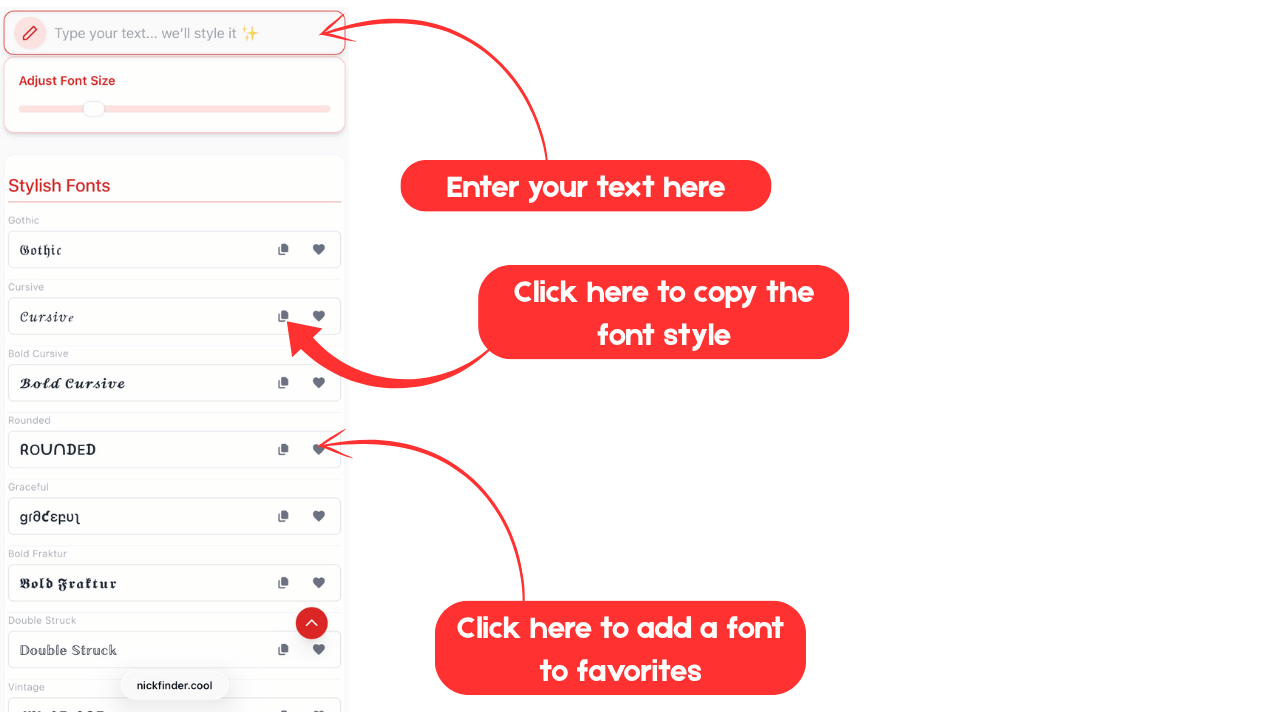
Adjust Font Size

Stylish Fonts

Gothic

𝔊𝔬𝔱𝔥𝔦𝔠

Cursive

𝒞𝓊𝓇𝓈𝒾𝓋ℯ

Bold Cursive

𝓑𝓸𝓵𝓭 𝓒𝓾𝓻𝓼𝓲𝓿𝓮

Rounded

ᖇOᑌᑎᗪEᗪ

Graceful

ցɾმƈεբυʅ

Bold Fraktur

𝕭𝖔𝖑𝖉 𝕱𝖗𝖆𝖐𝖙𝖚𝖗

Double Struck

𝔻𝕠𝕦𝕓𝕝𝕖 𝕊𝕥𝕣𝕦𝕔𝕜

Vintage

ᏉᎨᏁᏖᎯᎶᎬ

Symbolic

ꮪꝟꕮꞗꭴ꒒ꭵꮯ

Tribal

ፕዪጎጌልረ

Historical

ꃅꀤꌗ꓄ꂦꋪꀤꉓꍏ꒒

Simple Fonts

Bold

𝗕𝗼𝗹𝗱

Italic

𝐼𝑡𝑎𝑙𝑖𝑐

Bold Italic

𝑩𝒐𝒍𝒅 𝑰𝒕𝒂𝒍𝒊𝒄

Sans-Serif Bold

𝗦𝗮𝗻𝘀-𝗦𝗲𝗿𝗶𝗳 𝗕𝗼𝗹𝗱

Sans-Serif

𝖲𝖺𝗇𝗌-𝖲𝖾𝗋𝗂𝖿

Sans-Serif Italic

𝘚𝘢𝘯𝘴-𝘚𝘦𝘳𝘪𝘧 𝘐𝘵𝘢𝘭𝘪𝘤

Sans-Serif Bold Italic

𝙎𝙖𝙣𝙨-𝙎𝙚𝙧𝙞𝙛 𝘽𝙤𝙡𝙙 𝙄𝙩𝙖𝙡𝙞𝙘

Small Capital

ꜱᴍᴀʟʟ ᴄᴀᴘɪᴛᴀʟ

Monospace

𝙼𝚘𝚗𝚘𝚜𝚙𝚊𝚌𝚎

Wide

Wide

Parenthesized

🄟⒜⒭⒠⒩⒯⒣⒠⒮⒤⒵⒠⒟

Cool Fonts

Bubble

Ⓑⓤⓑⓑⓛⓔ

Dark Bubble

🅓🅐🅡🅚 🅑🅤🅑🅑🅛🅔

Block

🄱🄻🄾🄲🄺

Emoji

📧Ⓜ️🅾️🎷ℹ️

Cute

ꏳꀎ꓄ꍟ

Square

🆂🆀🆄🅰🆁🅴

Wavy

ꅏꍏꏝꐞ

Reverse Text

txeT esreveR

Upside Down

∩dsᴉpǝ ᗡoʍu

Mirror Text

Miɿɿoɿ Tɘxƚ

Backward Flip Text

𐐒ɐɔʞʍɐɹp Ⅎlᴉd ⊥ǝxʇ

Small

ˢᵐᵃˡˡ

Ancient

𒀀𒉌𒃲𒄿𒂊𒉌𒋾

Eastern

乇卂丂丁乇尺几

Subscript

ₛᵤbₛcᵣᵢₚₜ

Old Italic

Ꝋ𐌋𐌃 𐌉𐌕𐌀𐌋𐌉𐌂

Super Script

ˢᵘᵖᵉʳ ˢᶜʳⁱᵖᵗ

Modern Fonts

Soft

ꌚꂦꄘ꓄

Dreamy

ᗪᖇᗴᗩᗰƳ

Fantasy

Ғαηŧαѕγ

Blended Asian

乃レ乇刀り乇り ム丂ノム刀

Prime

Ρ૨เɱε

Modern

ᴍᴏᴅᴇʀɴ

Shadow

SᕼᗩᗪOᗯ

Iconic

ꀤꉓꂦꈤꀤꉓ

Striped

Sŧɍɨꝑɇđ

Adaptive

ᗩ∂ɑρтíѵҽ

Varied

Ʋαяιє∂

Squiggle

รợยเﻮﻮɭє

Signature Fonts

Playful

քӀąվƒմӀ

Refined

ʀɘꜰɪɴɘᴅ

Minimal Charm

mιᥒιmᥲᥣ ᥴhᥲrm

Gentle

ɠҽɳʈʅҽ

Trendy

ŧɽȅɲđ¥

Paint

քąìղէ

Decorative

ḋἔƈὄʀᾄҭἷνἔ

Reverse Style

ɹǝʌǝɹsǝ sʇʎןǝ

Unique Glyph

υⲛⳕqυⲉ ⳋⳑⲩⲣⲏ

Antique

αɳƭเφµε

Static

ƨƭʌƭɪƈ

🧠 Generating new fonts...

Report Error

Next page

Discover Different Font Styles

What is NickFinder?

NickFinder is a friendly, fast, browser-based tool built for Free Fire players who want a unique identity without the fuss. Instead of spending hours tinkering with characters and symbols, NickFinder serves up hundreds of ready-made, carefully crafted nicknames that look great in-game, on social profiles, and anywhere else you want to be remembered. No downloads, no logins — just open the site, type a keyword or your name, and explore dozens of on-point variations until you find the one that feels right.

We designed NickFinder for players who care about style, clarity, and compatibility. Every suggestion is Unicode-friendly and tested to display correctly across devices and regions — whether you’re in India, Brazil, Indonesia, or anywhere else. Think of it as a tiny creative studio for gamer IDs: instant inspiration, neat previews, and one-tap copy.

NickFinder

300+ Unique Nickname Styles

A huge, categorized library of names — from minimalist tags to heavily styled, symbol-packed IDs — so you can quickly match names to mood, role, or persona.

One-Tap Copy

Instant copy makes switching names painless. Pick a style, tap copy, and paste it into Free Fire, your social bio, or a guild title.

Works on All Devices

Responsive UI that loads fast on phones and PCs — perfect when you want a new name before a match or to brand your channel thumbnail on the fly.

Create the Perfect Free Fire Name with NickFinder

In online games your nickname is a quick introduction — it’s how teammates call you, how opponents remember you, and how fans search for your clips. NickFinder helps you discover names that hit the sweet spot between personality and readability. Whether you want something slick and short, dramatic and bold, or playful and emoji-rich, the tool produces variations that are ready to use.

More than just pretty symbols, the names are designed with practicality in mind: they prioritize characters that render consistently across Android and iOS, avoid glitch-prone glyphs, and keep length limits in mind so your name doesn’t get cut off in menus or overlays.

Why NickFinder Works for Gamers

We took a few simple principles and built the tool around them: variety, speed, and reliability. That means lots of styles arranged by theme, instant previews so you can judge a name at a glance, and copy-ready output that plays nicely with Free Fire and social platforms.

Built for clarity and flair

A great gaming name is readable in a crowded lobby and interesting enough to stick in viewers’ heads. NickFinder balances readability with visual personality — using subtle symbols and framing elements that add attitude without making your name look like random noise.

Localized and global

Whether you prefer English, regional scripts, or playful emoji additions, NickFinder supports Unicode so you can create names in multiple languages. This makes it simple to match local tastes or craft globally appealing gamer tags.

What You’ll Find: Deep Library of Styles

Our catalog is organized to help you find the vibe you want fast. Below are the broad families of styles with a few examples of what each aims to deliver.

Stylish Names

Cursive, Bold, Gothic, Double Letter — sophisticated looks for players who want a professional, timeless tag.

Great for streamers who want a clean brand and for players who value a refined, classic impression.

Simple Names

Minimal, Classic Gamer, Wide Text — short and readable names perfect for competitive play and shoutouts.

Short names are easier to remember and perform better in overlays and HUDs.

Cool Names

Bubble, Flip Text, Ancient — playful or edgy styles that stand out in lobbies and on social posts.

Use these when you want personality that’s loud and fun.

Modern Names

Shadow, Prime, Squiggle — contemporary treatments for players following trends and aesthetic feeds.

Perfect for content creators who want an on-trend identity that photographs well in thumbnails.

Signature Names

Handwritten, Decorative — names that look like a signature, ideal for branding and channel identities.

When you want to feel personal and distinctive, these are a strong choice.

Underline Effects

Double Line, Slash, Frame Line — subtle emphasis to make your tag pop in leaderboards.

Useful for making specific parts of your name stand out without overwhelming the whole tag.

Symbol Wrappers

Curly Wrap, Star Wrap — bracket-style symbols that frame your name for extra impact.

Good for clan tags or when you want your name to read like a title.

Crown Accents

Crown, Wave Cap — subtle regal cues to give your name an authoritative look.

Often used by team leaders or players who want a dominant presence in-game.

Intersect Accents

Cross Marks, Curve Bind — decorative lines that add motion and structure to names.

Give names a modern, engineered feel that reads well in fast-paced matches.

Loopy Symbols

Loop Mark, Curvy End — playful, bouncy symbols for a friendlier vibe.

Perfect for casual players and friendly clan tags.

Framed Names

Soft Frame, Bracket Box — strong borders for a bold, structured ID.

Helps names stand out in video thumbnails, streams, and banners.

Symbol Fusion

Hybrid mixes like Star Pop or Zig Glitch that blend multiple effects for a unique look.

Use these when you want a signature that’s hard to miss.

Flowing Frames

Corner Arc, Soft Grid — smooth, flowing borders for calm, aesthetic names.

Great for creators with minimalist or pastel-themed branding.

Kawaii Faces

Cute smileys and bunny faces — adorable additions to names for a soft look.

Popular with younger players and content made for a casual, playful audience.

Ornamental Frames

Celestial Spiral, Noble Edge — premium decorative frames for luxury-style IDs.

Use these for team banners or polished freelancing identities.

Bold Borders

Block Border, Stream Line — heavy, confident frames that read well at small sizes.

Works great for competitive tags and quick recognition in match lobbies.

Whimsical Frames

Star Trail, Sparkle Burst — playful and magical accents for a fantastical feel.

Useful for creators who want personality and charm in one package.

Artistic Names

Elegant Script, Blossom Wrap — names that feel handcrafted and creative.

Excellent for artists, designers, and streamers who want a cultivated presence.

Emoji-Inspired Names

Sparkle Text, Cute Animal — combine emoji and text for high-recognition tags.

Helps short names feel friendlier and more expressive on social posts.

Random Names

Glitch Edge, Mystery Mix — unpredictable combos if you want something genuinely different.

Perfect when you want to surprise your friends with an unexpected identity.

With so many curated categories, NickFinder makes it simple to try new directions: mix a crown accent with a clean signature name or add a subtle frame to a short bold tag. That flexibility is what helps players craft identities that feel personal.

How to Use NickFinder: Step-by-Step

How to Use Our NickFinder?

Using NickFinder is intentionally simple — we prioritize speed so you can find a great name between matches or while recording content. Follow this short flow and you’ll have a polished nickname in seconds.

  1. Enter Your Name or Keyword: Put in anything that inspires you — your actual name, a word you like, initials, or a theme (like "Shadow" or "Nova").
  2. Browse Name Styles: Scroll categories to see previews. Hover or tap a suggestion to view variants and small modifications.
  3. Refine the Result: Try swapping a crown, underline, or symbol wrapper to tweak emphasis and feel.
  4. Copy Your Favorite: Tap the copy button to put the name on your clipboard, then paste into Free Fire, your social bio, or a guild title.

Pro Tips: Choosing a Name That Lasts

A name you love today should still feel right in a few months. Use these quick tips to pick an enduring nickname.

  • Keep it short: Short names read better in match overlays and are easier for fans to remember.
  • Test across devices: Paste the name into a chat, profile, and a bio preview — make sure it doesn’t break or clip.
  • Avoid confusing glyphs: Decorative characters can look cool but may be misread by teammates. Balance style with clarity.
  • Think brand, not just style: If you’re building a channel, choose a name that’s searchable and easy to spell.
  • Use consistent themes: Keep the same or similar nicknames across platforms for recognizability.

NickFinder Comparison Table

Wondering how NickFinder stacks up? Here’s a quick reference that highlights what we prioritize compared to generic nickname tools.

Feature nickfinder.cool Other Tools
Total Nicknames 300+ 50–100
No Login Needed
Copy-Paste Support ✅ Everywhere ❌ Limited
Mobile Friendly ✅ Fully Responsive ❌ Some Bugs
Real-Time Preview
Unicode Compatibility
Global Performance ✅ Instant Load ❌ Variable

Creative Ways to Use NickFinder

NickFinder is more than a one-off name picker — it’s a creative lab. Here are some ways players use it beyond the main profile name.

  • Guild Names: Create intimidating or thematic guild titles with matching accents for a cohesive team brand.
  • Pro-Level Usernames: Pick clean, iconic names that translate well to overlays and sponsor graphics.
  • YouTube & Shorts: Use short, memorable names for watermarks, channel handles, and thumbnails.
  • Short Nicknames: Discover premium 3–5 letter names that are rare and high-impact.
  • Chat & Group Names: Make themed names for Discord roles, WhatsApp groups, or Instagram gaming circles.

NickFinder for Every Platform

While NickFinder is optimized for Free Fire, the output works well across modern platforms. Below are quick notes to get the best results for each one.

🟣 Names for Instagram

Instagram profiles and bios benefit from aesthetic names that photograph well. Pick a short base name and add a subtle symbol or frame — it reads nicely under profile pictures and in captions.

Pro Tip: Avoid excessive symbols in your handle itself; use them in your display name or bio where they don’t affect searchability.

🔵 Names for Facebook

Facebook groups and pages can use longer framed names for banners and titles. Choose a name with a bold border or underline to stand out in cover images.

Pro Tip: Test how the name appears on mobile and desktop to ensure consistent presentation.

🔴 Names for TikTok

TikTok favors short, punchy names that are easy to spot in comments and video overlays. Glitch or emoji-inspired styles work well for fast-paced content.

Pro Tip: Keep names short for watermarks and captions so they don’t obstruct video content.

🐦 Names for Twitter

Twitter handles should remain readable and searchable. Use NickFinder to craft display names that complement a short handle, not replace it.

Pro Tip: Reserve decorative characters for the display name and keep the actual @handle plain for discoverability.

💬 Names for Discord

Discord lets you be more creative with nicknames in servers and roles. Use framed and bold designs for role titles or clan member tags to create a polished server identity.

Pro Tip: Use consistent themes across role names to give your server a professional feel.

Tips for Getting the Best Free Fire Name

Choosing a name is half creativity, half practical testing. These quick guidelines will save you from common pitfalls.

  • Keep it short: Shorter names look cleaner and are easier for fans to tag and remember.
  • Avoid too many symbols: Decorative elements are fun, but too many can make a name unreadable at small sizes.
  • Match your playstyle: Aggressive players can pick bold, sharp styles; chill players can select softer, aesthetic variants.
  • Use consistent themes: Keep the same nickname style across platforms to build recognition.
  • Experiment with variations: Slight changes in spacing, capitalization, or a single accent can transform a name from common to unique.

Why Gamers Love NickFinder

Millions of players rely on NickFinder because it’s dependable, fast, and creatively rich. Instead of random generators that produce unreadable output, NickFinder focuses on balanced, usable names that look great in matches and on profiles.

Its Unicode-first approach prevents odd rendering problems and ensures names look consistent across Android, iOS, and desktop browsers. New styles are added regularly so you’ll always have fresh inspiration.

Start Using NickFinder Now

Ready to update your identity? Visit nickfinder.cool, type a base word, and try a few styles — you’ll be surprised how quickly a tight, memorable nickname appears. Whether you want something subtle and classy or loud and unforgettable, NickFinder makes the process quick, enjoyable, and reliable.

Perfect Free Fire Bios

Create bios and descriptions that pair beautifully with your chosen nickname — whether you want fierce, funny, or professional.

Epic Gamer Tags

Stand out in lobbies with bold, well-crafted nicknames that look great on leaderboards and streams.

Stylish Names & Captions

Use NickFinder to fine-tune names for thumbnails, captions, and channel branding so everything looks cohesive.

NickFinder FAQ

Is nickfinder.cool free to use?

Yes — NickFinder is completely free. You can explore all name styles and copy as many suggestions as you like without creating an account. That makes it easy to experiment until you find the name that fits you best.

Can I use these names in Free Fire?

Absolutely. Every name generated by NickFinder is Unicode-based and tested to display correctly in Free Fire profiles, guild titles, and in-game text fields. If a particular symbol is blocked by the game, the preview helps you spot it before pasting.

Is any software required?

Nope. NickFinder runs entirely in your browser so there’s nothing to install. It works on Chrome, Firefox, Safari, and other modern browsers.

Will these styles display correctly on mobile?

Yes — we prioritize mobile compatibility. The preview and copy functions are optimized for touch devices, and the styles use characters that render consistently across Android and iOS.

Can I generate symbols and stylish elements?

Definitely. NickFinder includes symbols, emoji combinations, and decorative accents. We recommend testing the final name in a profile field to confirm it displays as you expect, especially if you combine multiple rare glyphs.

How can I share the nickname I create?

Copy the name using the provided button, then paste it anywhere: Free Fire, Discord, Instagram, or a guild message. You can also save your favorites externally if you’re experimenting with multiple options.

How are the names categorized?

We organize names into themes like Stylish, Cool, Modern, Symbolic, Kawaii, and more to make it faster to find a vibe that matches your personality or content style.

Do these names work in usernames?

Most generated names work well as display names in Free Fire and other platforms. For platform handles (like @usernames), remember that some sites restrict certain symbols — keep the handle plain and use styled text in your display name for the best of both worlds.

What are stylish name effects?

Effects include frames, crown accents, intersect accents, loops, and emoji elements — each designed to add visual identity without sacrificing readability. Try mixing small accents with a plain base name for subtle flair.

Can I use NickFinder for professional gaming IDs?

Yes. Many competitive players and content creators use NickFinder to craft clean, professional names that translate well to branding — overlays, sponsor mentions, and team rosters benefit from concise, readable tags.

How often are new styles added?

We add new styles on a regular cadence to reflect trends, new emoji sets, and community requests. That keeps the library fresh and useful for creators who want to stay on-trend.

Does NickFinder support non-English names?

Yes — nicknames can be created using many scripts supported by Unicode, including regional languages. If you create a name in a non-Latin script, test it across devices to ensure consistent rendering.

Can I combine multiple name styles?

Of course — mixing a frame with a subtle underline or swapping a symbol wrapper is a great way to create a custom look. Just keep an eye on readability when combining heavy effects.